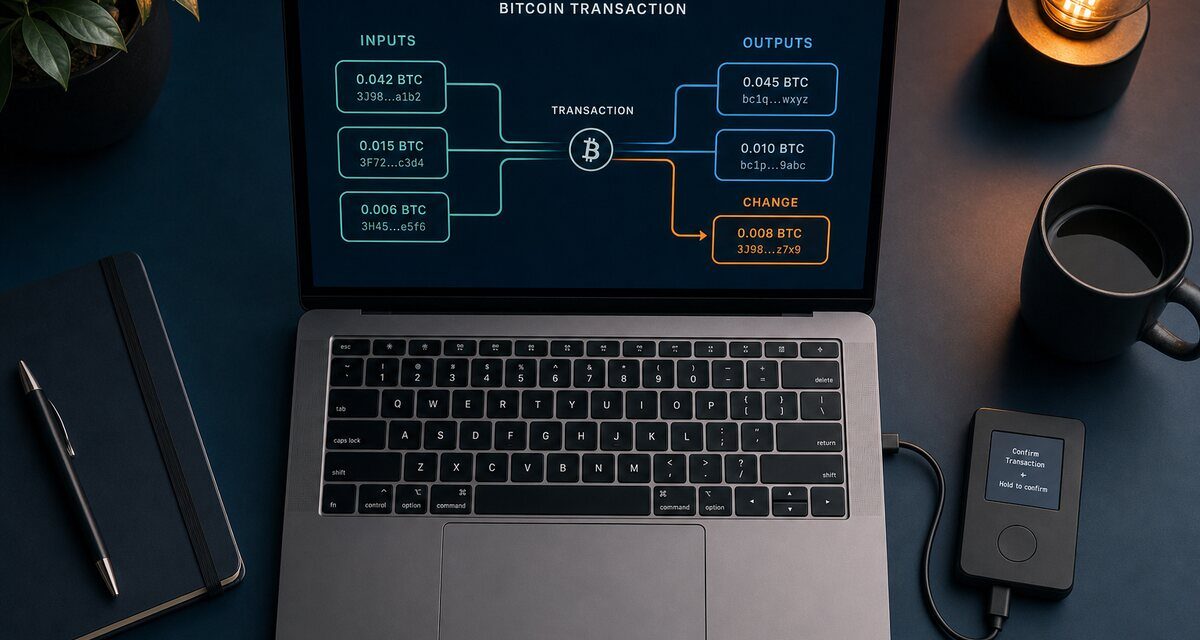
Short answer: when you send bitcoin from a hardware wallet, your computer builds an unsigned transaction (usually a PSBT, defined in BIP 174) and the device signs it. On the device screen, check every output: the address you are paying, the amount, the fee, and that any change goes back to an address your wallet recognises as its own.
What a PSBT is
A Partially Signed Bitcoin Transaction is a standard format that lets one program build a transaction and another sign it. It carries extra information the signer needs, including, for each output that belongs to you, the derivation path. That data is what allows a signing device to recognise change outputs and confirm that the change really comes back to your wallet.
What to check on the device
- Each payment output: the full destination address and the exact amount in BTC.
- The fee: make sure it matches what you chose. An unexpected fee may mean a manipulated transaction.
- Change: a well-behaved device either hides the change output because it has verified it belongs to you, or labels it clearly. If you see an extra output you do not recognise, stop: it may be an attacker’s address disguised as change.
- Network: mainnet, not testnet, unless you mean it.
Multisig: one more trap
In a multisignature setup, change can also be tampered with in subtler ways. In 2019, a bitcoin-dev discussion led by Stepan Snigirev described how an attacker could replace some of the keys in a multisig change address and still get the transaction signed, unless the signer can check that the change uses the same set of extended public keys as the inputs. Modern multisig coordinators and signing devices register the wallet’s configuration on the device for this reason. Always register your multisig wallet on each device and verify the configuration.
Good habits
- Verify receive addresses on the device before sharing them.
- Prefer wallet software that supports PSBT and shows clear previews, and keep firmware up to date.
- For large amounts, send a test transaction first.
Frequently asked questions
Why don’t I always see my change output on the device?
Many devices hide change that they have verified belongs to your wallet, using the derivation information in the PSBT, and show only the outputs that leave your wallet. If an unexpected output appears, stop and check.
What is PSBT version 2?
BIP 370 defines a newer version of the PSBT format that makes some workflows easier, for example adding inputs and outputs step by step. The verification principle does not change: check outputs, amounts and fee on the device.
Do I need to register a multisig wallet on my device?
Yes, when your device supports it. Registering the wallet configuration (the extended public keys and the quorum) lets the device verify that change and receive addresses really belong to your multisig.
Sources
- BIP 174: Partially Signed Bitcoin Transaction Format
- bitcoin-dev mailing list (June 2019): multisig change verification
Educational content, not financial advice. Some links on this site are affiliate links: see our disclosure.